Name the exercise
Type the exercise you are checking, then record or upload the clip. VeraLift uses the video to keep the feedback grounded in what actually happened.
Train alone without guessing what happened on video. Record or upload a short clip of any exercise and get a private form check with timestamped cues, confidence labels, and clear recording guidance when the view is not reliable enough to score.

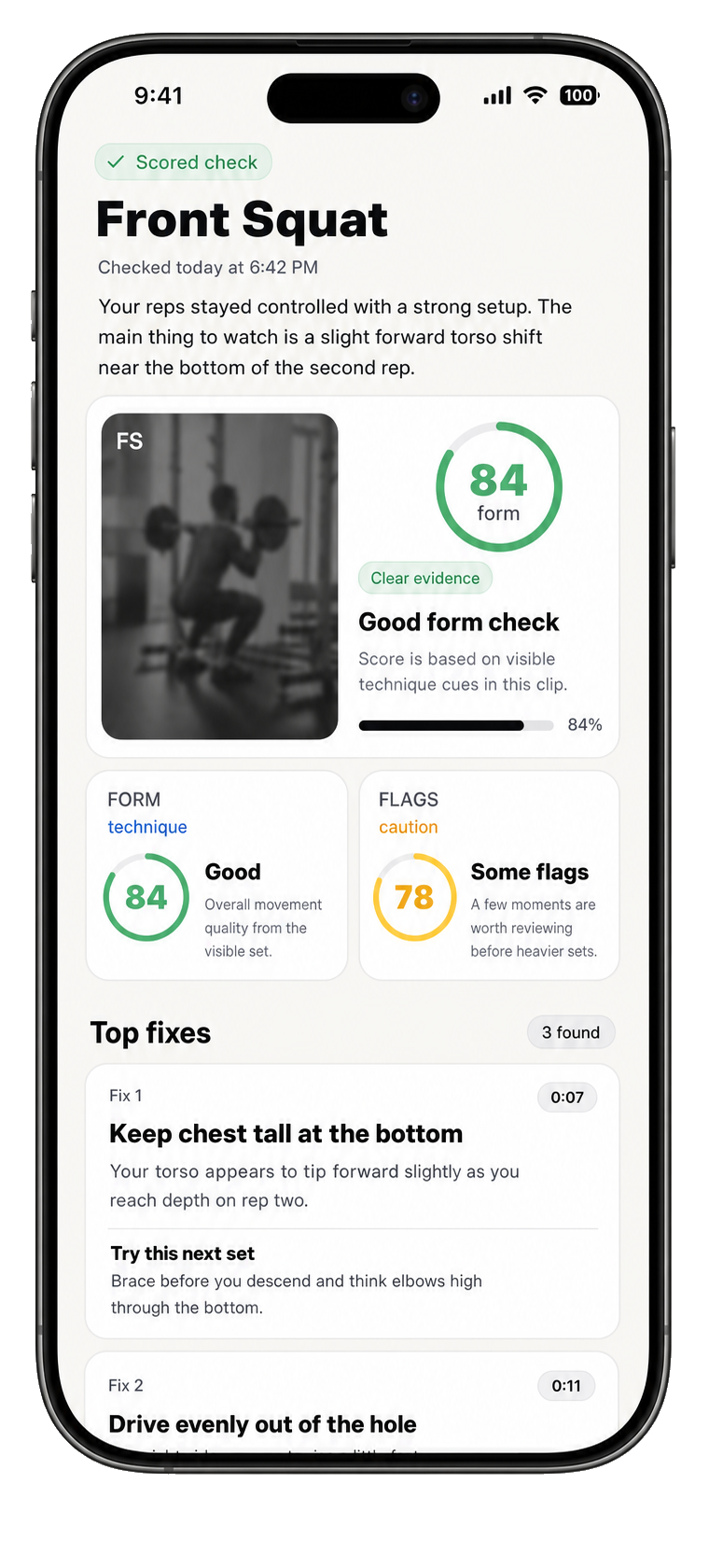
Type the exercise you are checking, then record or upload the clip. VeraLift uses the video to keep the feedback grounded in what actually happened.
Short clips work best. Keep the full movement in frame, start before the first rep, and stop shortly after the last rep.
See the form score, timestamps, top fixes, confidence labels, and recording notes in the app while the set is still fresh.
VeraLift is built to make one clip actionable, especially when you do not have a coach watching every set.
Each finding is tied to a moment in the clip, so you can rewatch the rep instead of decoding generic cues.
Top fixes are kept short and practical, so you can take one or two clear cues back into training.
Keep checks attached to your own history instead of waiting for strangers to comment on a public video.
Short answers for what VeraLift does, what it does not do, and how your videos are handled.
No. VeraLift is focused on technique feedback from short videos. It is not a workout planner, calorie tracker, social fitness app, or replacement for a qualified coach.
VeraLift supports any exercise you can record clearly. Type the exercise name, upload or record the video, and VeraLift checks the movement shown in the clip.
Public form checks can be slow, inconsistent, and uncomfortable. VeraLift gives a private, structured first read with timestamps, confidence language, and a saved history you can revisit.
Use a 5-30 second clip where the full movement is visible. A side or 45-degree angle usually works well. Keep the camera steady and avoid mirrors, heavy cropping, and strong backlight.
No. VeraLift is built around visual form review. Audio is not needed for feedback.
VeraLift gives recording guidance instead of forcing a form score. Unclear clips are treated differently from scored checks.
Yes. VeraLift is designed so you can understand the form-check experience with your own training footage before deciding whether it belongs in your routine.
No. VeraLift does not diagnose injuries, provide treatment, guarantee injury prevention, or replace a physician, physiotherapist, personal trainer, or coach.
Yes. The app includes account deletion and content controls. Some limited records may remain where required for security, legal, billing, or backup reasons.
VeraLift does not diagnose injuries, promise injury prevention, guarantee perfect form, or replace a coach, trainer, physician, or physiotherapist. It is technique feedback for awareness, confidence, and better review habits.
Useful feedback starts with admitting what the video does and does not show.
Then review the clearest cues while the session is still fresh.